Sponsors are one of the most reliable ways to earn revenue as a creator. With Station, you can showcase sponsor deals directly in your newsletters, Link-in-Bio, and other placements — giving brands the visibility they want while you maximize your income.
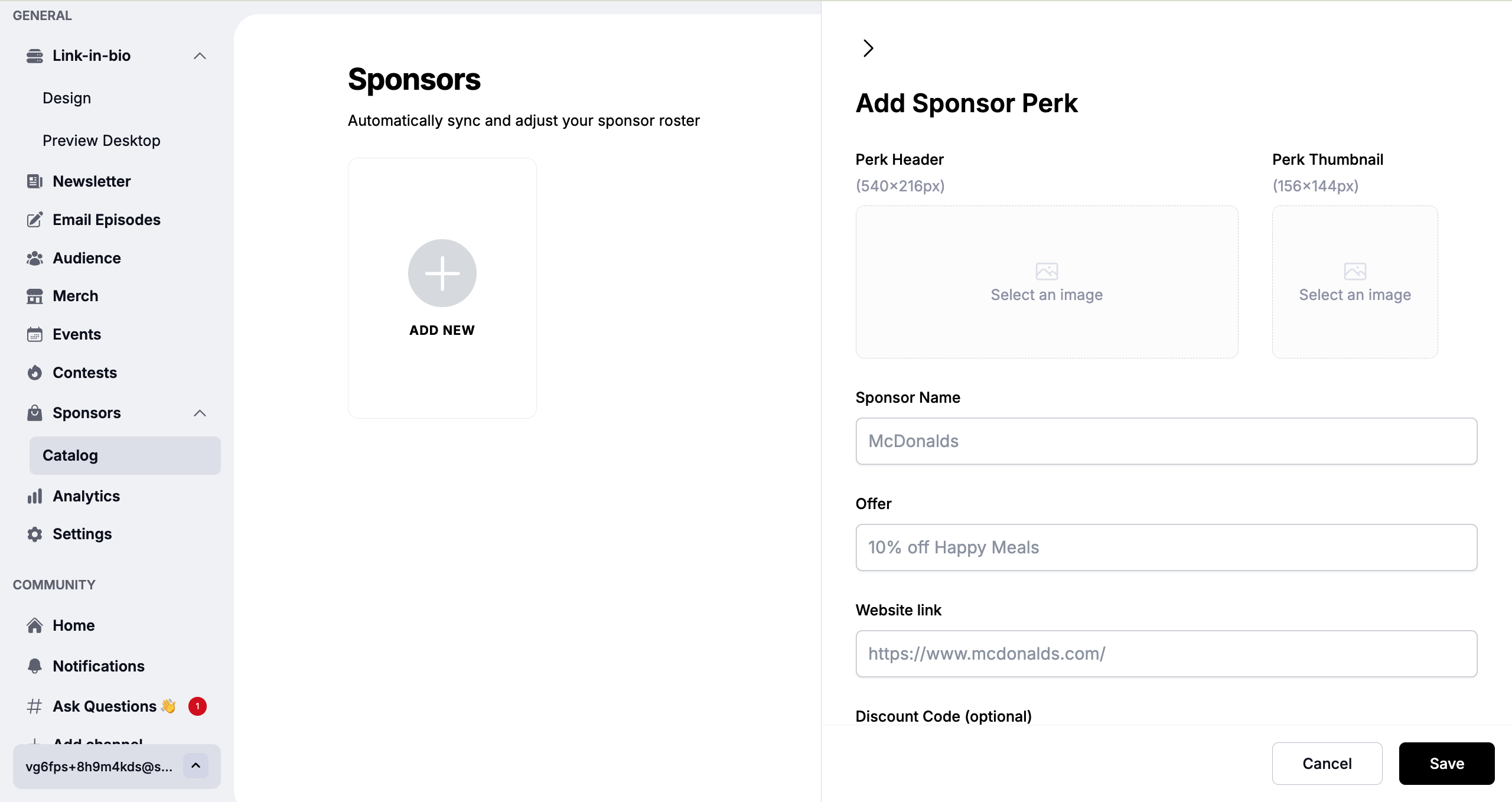
1. Go to Sponsors in Your Dashboard
From the left menu, click Sponsors → Catalog
and then select Add New.
2. Enter Sponsor Details
Fill in the fields for:
Sponsor Name: (e.g., McDonalds)
Offer: (e.g., 10% off Happy Meals)
Website Link:
Discount Code: (optional)
3. Upload Creative Assets
Add a Perk Header (540×216px) and a Thumbnail (156×144px) to showcase your sponsor’s brand.
4. Save Your Sponsor Perk
Click Save to add the sponsor to your catalog. It will now be available for use in newsletters, Link-in-Bio, and other placements across your Station ecosystem.
Premium Deal → One sponsor featured prominently at the top of your newsletter or page. Best for higher rates.
Deal Stack → Multiple sponsors showcased together in different sections. Ideal for diversifying income streams.
Use Station’s Sponsor Analytics to see:
Click-through rates
Conversion performance
Revenue generated
Share these insights with sponsors to build long-term relationships and justify higher pricing.